


With subscription prices rising and free tiers becoming more limited, many users are looking for ways to enjoy YouTube Music premium features without paying monthly fees. That's where YouTube Music ReVanced enters the conversation. Promising ad-free listening, background playback, and unlocked premium features, it has quickly gained popularity among Android users.
But an important question remains: Is YouTube Music ReVanced safe? And if you decide to try it, how do you properly download and install YouTube Music ReVanced in 2026?
In this guide, we'll break down everything you need to know - from how ReVanced YouTube Music works, to installation steps, common errors like ReVanced YouTube Music error 400, FAQs, and a safer alternative for downloading music. Let's start!

Part 1. What's ReVanced YouTube Music?
YouTube Music ReVanced is a modified (modded) version of the official YouTube Music app. It is built using the ReVanced patching framework, which allows users to apply custom modifications to the original APK and unlock certain premium-style features.
ReVanced is widely considered the spiritual successor to YouTube Vanced, which was discontinued in 2022. However, unlike Vanced, which used to distribute a pre-built modified APK, ReVanced generally requires users to patch the official YouTube Music APK themselves using ReVanced Manager.
Another key difference from the official app published by Google is distribution. ReVanced is not available on the Google Play Store. Instead, it must be obtained from third-party sources and installed manually. This process involves enabling "Install from Unknown Sources" and sometimes installing additional components such as MicroG for account login support.
In short, YouTube Music ReVanced is one of the most useful and free options for Android users. Instead of calling it a "cracked" software, it's more like a "modified and enhanced version" (for users). But it modifies the original application to change how certain features behave, which is why questions about safety, legality, and stability frequently arise.
What Features Does ReVanced YouTube Music Offer?
Most users are drawn to YouTube Music ReVanced because it promises features that closely resemble those offered by YouTube Music Premium - without requiring a paid subscription.
Some of the most commonly highlighted features include:
- Background playback without a Premium subscription
- Ad-free listening experience
- Higher audio quality options
- Skipping restrictions removal
- UI customization and layout tweaks
- Playback without screen-on requirement
For many Android users, these enhancements make the app feel similar to a premium-tier experience. However, it's important to understand that these features are enabled through client-side modification rather than official server authorization.
ReVanced YouTube Music vs. YouTube Music Premium
Below is a general comparison between ReVanced YouTube Music and the official YouTube Music Premium service:
| Feature | ReVanced YouTube Music | YouTube Music Premium |
|---|---|---|
| Price | Free (unofficial) | Paid subscription ($10.99/month) |
| Source | Third-party patching | Official Google Play / App Store |
| Offline Downloads | ❌(Except with external tools like Seal or YTDL) | ✅ |
| Audio Quality | Up to 256kbps AAC/Opus | Up to 256kbps AAC/Opus |
| Output Format | Streaming only (MP3/M4A possible via Seal or YTDL as search engine) | Protected AAC |
| Ad-Free | ✅ (Includes SponsorBlock) | ✅ |
| Background Playback | ✅ | ✅ |
| Compatibility | Android only | Android, iOS, Web |
| Update Frequency | Community-dependent | Regular official updates |
This comparison makes one thing clear: while ReVanced can replicate certain premium-style behaviors, it does not replace official subscription benefits such as guaranteed stability, secure updates, and official offline downloads. Despite the above, ReVanced YouTube Music also comes with notable limitations and risks:
- Android-only support (no iOS compatibility)
- Potential account suspension risk due to Terms of Service violations
- Possible data privacy concerns depending on download source
- App instability or unexpected crashes
- No official security updates
- Offline downloads are not officially supported
Because the YouTube Music ReVanced app relies on patching a specific version of the YouTube Music APK, it may stop working whenever Google updates its backend systems. This frequently results in playback errors, login failures, or issues such as "revanced youtube music error 400".
If you value data privacy, account security, and want a more versatile way to save YouTube Music in an accessible, unprotected local format, you may consider a stable alternative introduced in Part 5 - AudFree Streaming Audio Recorder. It provides a more secure and consistent solution without modifying the official app environment.
For users who prioritize long-term reliability, consistent updates, and account safety, these trade-offs should be carefully evaluated before installing ReVanced YouTube Music.
Part 2. How to Download & Install YouTube Music ReVanced
If you understand the limitations and potential risks and still want to proceed, here is how users typically install YouTube Music ReVanced on Android devices in 2026.
Step 1. You'll first need the ReVanced Manager APK from its official GitHub repository. Avoid third-party APK websites to reduce malware risk.
Never search for "YouTube Music ReVanced APK" on Google. Most pre-built APK sites are unofficial and may contain malware. The only 100% safe method is patching the official file yourself. (Link: https://github.com/ReVanced/revanced-manager)
Step 2. You must download a supported version of the official YouTube Music APK (not installed from Play Store, but as a separate APK file). You need a specific version of the official YouTube Music app to act as your "base".
- Open the ReVanced Manager and go to the Patcher tab.
- Look for YouTube Music to see the "Suggested Version" (e.g., v8.xx.xx). Make sure the version matches the compatibility list in ReVanced Manager.
- Download that exact version as an APK from a trusted source like APKMirror.
- Important: Download the APK, but do not install it yet.
Step 3. Because ReVanced is a modded app, it cannot use your phone's built-in Google Play Services for login. In such cases, you need to install GmsCore (Formerly MicroG) to enable account authentication. Download and install GmsCore from the official GitHub repository.
Step 4. Open ReVanced Manager and go to Patcher > Select an App. Tap Storage (bottom right) and select the YouTube Music APK you downloaded in Step 2. Then click Selected Patches to ensure essential features like "General Ads" and "GmsCore Support" are included. Tap Patch. This process will take 1-3 minutes while the code is modified.
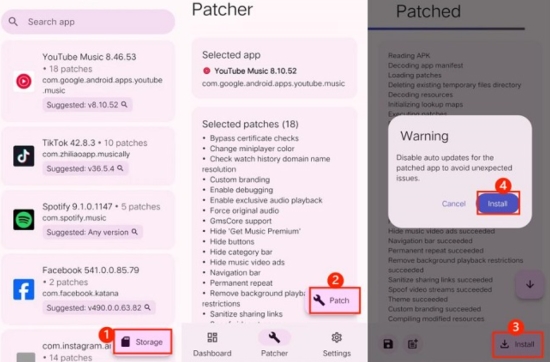
Step 5. Once patching is finished, tap Install. (If prompted, allow ReVanced Manager to "Install apps from unknown sources"). Open your new YouTube Music ReVanced app and log in using your Google account via the GmsCore prompt.
Though this has a Download icon in the YouTube Music Revanced app, you still cannot download songs from it, since the official "Download" button is a server-side Premium feature. ReVanced users typically use an External Downloader integration to make it. You can follow such steps:
First, install a third-party open-source app like Seal or YTDL-nis.
Second, in ReVanced settings, go to Settings > ReVanced > Interaction > External Downloader and link your installed downloader. You can then download any song or video directly to your phone's storage in MP3 or M4A format, without DRM protection.
Part 3. Troubleshooting: Fix ReVanced YouTube Music Not Working
Even when installed correctly, many users encounter issues. Let's look at common problems and solutions.
1. Fix ReVanced YouTube Music Error 400
The 'revanced youtube music error 400' usually regards a login or server communication issue, which typically means YouTube's servers have flagged your app as "unofficial".
✅ Try these fixes:
- Go to Settings > ReVanced > Miscellaneous and look for "Spoof App Version". Change the target version to a newer stable branch (e.g., v20.xx.xx). This tricks the server into thinking you are on the latest official build.
- Go to your phone's Settings > Apps > GmsCore, tap Storage, and select Clear Data. This refreshes your login token.
- Sometimes, ISP-level blocks cause this. Try switching your phone's Private DNS to dns.google or 1.1.1.1.
2. YouTube Music ReVanced App Crashes Immediately on Startup
If the app closes as soon as you tap the ReVanced icon, it is usually a foundation error.
✅ Try these fixes:
- Ensure GmsCore (MicroG) is actually and properly installed. Without it, the app has no "login engine" and will crash.
- Modern Android versions (Android 14/15/16) are aggressive with "killing" background apps. Go to App Info > Battery for both ReVanced and GmsCore and set them to "Unrestricted."
- Make sure you downloaded the correct YouTube Music APK version that matches the ReVanced YouTube Music app.
- Ensure you downloaded the arm64-v8a version of the APK from APKMirror, as most 2026 devices require this specific architecture.
3. Login or Account Problems
If you can't sign in to Revanced YouTube Music or your YouTube Music library isn't loading:
✅ Try these fixes:
- Go to your phone's Settings > Passwords & Accounts. Look for the account with the MicroG/GmsCore icon, remove it, and then re-add it through the ReVanced YouTube Music app.
- Sometimes Google Play Protect flags GmsCore during setup. Temporarily disable "Scan apps with Play Protect" in the Play Store settings while logging in.
ReVanced YouTube Music is a community project. If a major update from Google breaks the app, the best solution is often to wait 24-48 hours for a new "Patch" release in the ReVanced Manager, then re-patch your YouTube Music ReVanced APK.
Part 4. FAQs About YouTube Music Revanced App
Can I use ReVanced YouTube Music to download 'Video' instead of just 'Audio'?
Yes. While the app is designed for music, it pulls data from the same servers as YouTube. If you use an External Downloader (like Seal or YTDL-nis) as mentioned in Part 2, you will be given the option to save the file as either a high-definition Video (MP4) or a standalone Audio (M4A/MP3) file.
If ReVanced YouTube Music can't 'officially' download, why is there a Download button?
The 'Download' button appears by default is a 'hard-coded' part of the original YouTube Music interface. Because ReVanced modifies the app locally, instead of hacking Google's servers, clicking this button will still prompt you to buy a Premium subscription.
Is it safe to log in to ReVanced with my Google Account? Will I get banned?
While there have been no widespread reports of users being banned for using ReVanced, there is always some risk when logging into unofficial modified apps. Account suspension is technically possible since using modified apps violates YouTube's Terms of Service. For maximum safety, we recommend using a secondary account or even no login. This allows you to sync your music and likes without risking your main account's emails or photos.
Can I Download YouTube Music Revanced App on an iPhone?
No. ReVanced is built specifically for the Android framework and uses APK files, which iOS cannot run. If you are an iPhone user, look for uYouEnhanced or YTLitePlus. These are similar 'modded' versions for iOS, but they must be installed via Sideloading (using tools like AltStore or Sideloadly) rather than a simple APK install.
Are the downloaded files in an 'Open' format via ReVanced-Linked External Tool?
Yes. Unlike the official YouTube Premium downloads, which are encrypted DRM files that only work inside the YouTube app, files downloaded via the ReVanced-linked external tools are standard media files. You can move them to a PC, play them in VLC, or use them in any other media player.
Part 5. Best Alternative to YouTube Music Revanced - AudFree Streaming Audio Recorder
If you're worried about security risks, potential account bans, or frequent app crashes, a safer and more stable option is to use a desktop tool like AudFree Streaming Audio Recorder.
Unlike modified apps such as YouTube Music ReVanced, AudFree Streaming Audio Recorder does not alter or patch the official YouTube Music app. Instead, it captures streaming audio directly from 10+ major music platforms and saves it as high-quality local files on your computer.
As a professional all-in-one streaming music downloader, AudFree Streaming Audio Recorder supports multiple output formats and advanced audio parameter customization. It is designed to convert DRM-protected songs into common audio formats while preserving original sound quality and full ID3 metadata.
More importantly, you don't have to risk logging into modified apps or worry about account suspension. Let's be honest: installing and patching ReVanced YouTube Music can be complicated for beginners, especially when it comes to enabling offline downloads. AudFree tool offers a much more straightforward solution.
AudFree Streaming Audio Recorder

- Convert YouTube music to MP3, WAV, FLAC, and more formats
- Works with YouTube Music, Spotify, Tidal, Apple Music, and more
- Preserve original audio quality and full ID3 tags
- Batch convert albums and playlists at up to 30X speed
- Clean, user-friendly interface
- No modified apps required and accound ban risk
- Fully compatible with Windows & Mac
How to Download Youtube Music via AudFree Streaming Audio Recorder
- Step 1. Set Output Format of YouTube Music

- Launch the AudFree Streaming Audio Recorder for YouTube on the computer. Click the menu icon > Preferences > Conversion, then choose one of formats you prefer as the output format. You can also customize bitrate, sample rate, and audio channels. Under the Output tab, choose your preferred destination folder and enable ID3 tag retention if needed. Don't forget to click 'OK' to save settings.
- Step 2. Add YouTube Music Tracks for Conversion
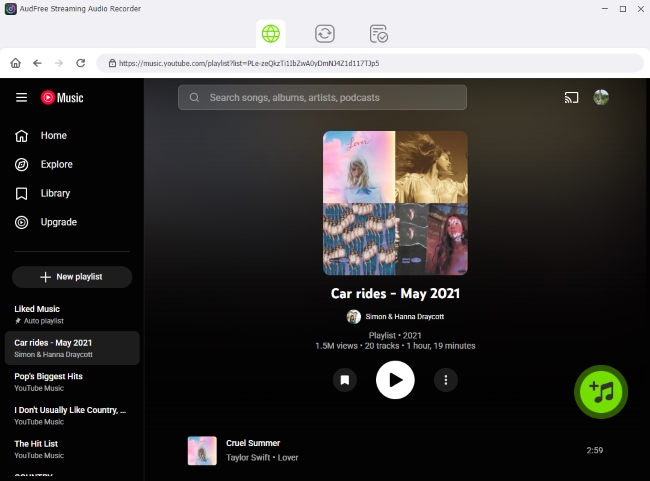
- From the main interface, open the built-in YouTube Music web player and sign in to your account. Browse songs, playlists, or albums you want to download. Click the green '+' button to add selected tracks to the conversion list. There is no limit on how many songs you can add at once, making it easy to batch download entire playlists or albums.
- Step 3. Start Conversion From YouTube Music to Local Files

- Go to the Converting tab and click Convert. AudFree tool will begin processing the tracks and save them as local files. Once completed, you can find your downloaded songs in the Converted section or in the output folder you selected. You can now transfer these local YouTube Music files to other devices, including iPhone, Android, USB drives, or music players, for seamless offline playback.
View also: How to Download YouTube Music to USB Drive
Pros and Cons of AudFree Streaming Audio Recorder
Safe and stable (no app modification required);
High-quality audio output with customizable settings;
Supports multiple streaming platforms;
Fast batch conversion;
Preserves full metadata;
No modified apps required and accound ban risk;
Beginner-friendly interface
Requires installation on a computer;
Not a free tool (trial version available)
Overall, if you value safety, convenience, and long-term reliability, AudFree Streaming Audio Recorder is a much more practical alternative to YouTube Music ReVanced app.
Conclusion
YouTube Music ReVanced offers tempting features like ad-free playback and background listening without a Premium subscription. However, it comes with real risks - security concerns, app instability, possible account suspension, and frequent technical issues such as Revanced YouTube Music error 400.
If you prioritize safety, stability, and long-term access to your music library, using a legitimate solution like AudFree Streaming Audio Recorder is a smarter alternative. It allows you to download and save YouTube Music tracks as local files without modifying apps or risking your Google account.

Staff Editor


