


"Can I convert Spotify to MP3?" Yes. With a Spotify Premium account, users can download music for offline listening. Yet, you can only download protected Spotify music in OGG Vorbis format and they can't be played on other devices. There is no official option to download MP3 files from Spotify.
In this case, to truly own your music and play them offline anywhere, you need to convert Spotify music files into MP3 and DRM-free format. There are some third-party and online free Spotify to MP3 converters arising in the market. But which one suits you?
To save you time and protect your devices, we have tested 5 100% working and legal ways and tools on Windows 11, macOS Tahoe and Android 15. With them, you can convert Spotify songs to MP3 for free, online, on PC, Mac, Android, iPhone, and more. After that, you can enjoy Spotify tracks anywhere offline.


Quick Verdict: Top 3 Spotify to MP3 Converter at a Glance
Before checking all the tools listed in the post, you can take a quick glance at the top 3 picks from our tests to save you time.
| Category | Our Pick | Best For | Rating |
|---|---|---|---|
| Best Overall | AudFree Spotify Music Converter | Batch downloading playlists, keep 100% original quality, support Lossless/FLAC/WAV, save lyrics and full ID3 tags. | ⭐️⭐️⭐️⭐️⭐️ |
| Best Online | Spotisaver | Download single track quickly, no need to install software. | ⭐️⭐️⭐️ |
| Best Free Recorder | Audacity | Tech-savvy users who want a 100% free and open-source recorder and don't mind real-time recording. | ⭐️⭐️⭐️⭐️ |
Method 1. How to Convert Spotify to MP3 on PC/Mac in 320kbps and Batch Download
For users who prefer high-quality and permanent music or have a large music library to be converted, professional desktop software is the only reliable method.
AudFree Spotify Music Converter stands out with its excellent functionality. By adopting the latest technology, this powerful tool can download and convert tracks, Liked Songs, albums, playlists, podcasts, etc. directly from Spotify to 320kbps MP3. Also, it can run at a 13X speed to save you time. Besides, this Spotify to MP3 converter is intelligent enough to embed all original ID3 tag info and keep original quality in the output Spotify files.
More importantly, you can convert Spotify to a wide variety of audio formats, like Lossless FLAC, AIFF, WAV, M4A, etc. using either Spotify Free or Premium account. Also, the output sample rate, bit rate and more can be altered according to your needs. With this tool, downloading Spotify music for offline playback is no longer a privilege for Premium subscribers only.
✅ Download Spotify Songs in Batch Unlimitedly at Lightning Speed: All Spotify content, including audiobooks, podcasts, albums, playlists, single songs, etc. can be downloaded in batches at 13X speed.
✅ Convert Spotify Music to Common Formats at up to 320kbps and Lossless Quality: Apart from MP3 audio format, AudFree Spotify Music Converter also supports AIFF, Lossless, M4A, M4B, FLAC, and WAV. The output audio quality will be kept as the original files supported by the Spotify Premium plan during the conversion process.
✅ Preserve ID3 Tags, Lyrics and All Metadata: It can retain the original metadata and ID3 tags of the tracks, including titles, artists, albums, album art, lyrics and more. All converted files are well-organized and easily identifiable.
✅ Customizable Output Settings: You can typically customize various output settings such as bit rate (up to 320kbps), sample rate (up to 192kHz), channel, and more depending on your preferences. The way of archiving Spotify files could be defined as "None, Artist, Album, and Artist/Album".
✅ User-Friendly Interface: AudFree Spotify Music Converter has an intuitive and user-friendly interface. It allows you to easily navigate, add Spotify songs, adjust output settings, and initiate the conversion process.
✅ Block Ads from Spotify: During the downloading and conversion process, ads in the Spotify music tracks will be removed automatically by AudFree Spotify Music Converter.
✅ Safe to Use: No ads, no malware and no risk of Spotify account bans.
How to Convert Spotify to MP3 at High Quality and High Speed via AudFree Spotify Converter
Now, learn how to use AudFree Spotify Music Converter to download Spotify in MP3 tracks.
Step 1. Open and add Spotify songs to AudFree Spotify Music Converter
Install and launch the AudFree program. Then simply drag & drop Spotify music from the built-in Spotify web player online to the AudFree '+ ♫' section. You can also tap and add music by clicking the '+ ♫' icon. Then touch the 'Add to list' option in the pop-up window.

Step 2. Define Spotify music output format as MP3
Click the top-right 'menu' icon to select 'Preferences' > 'Conversion' in the open setting window. The default output format is MP3 so you don't need to change it. But you can alter other output parameters including the channel, sample rate, etc. Once done, click on the 'OK' button at the bottom of this Spotify MP3 converter.

Step 3. Convert Spotify to MP3 on Windows/Mac
Click the 'Convert' button in the Converting window to download Spotify music without Premium. After the conversion, you can check the downloaded Spotify MP3 music files by clicking the 'Converted' option. Now, you can transfer them to any player and device for offline playing without any restriction.

- Video Guide. How to Convert Spotify Song to MP3
By the way, here is a video demo to guide you on how to use AudFree Spotify Music Converter to convert Spotify to MP3 step by step. Just tap the Play button to start learning.
Convert Spotify music to WAV, MP3, FLAC, AIFF, M4A, etc.;
Zero quality loss during the conversion process;
Support batch conversion at a 13X high-speed;
Keep all metadata of Spotify music, including the title, artist, etc.;
Sort output Spotify downloads by artist or album automatically;
Remove annoying ads from Spotify without Premium on Windows/Mac;
Support to play Spotify music on all devices and players offline
The free trial allows users to convert only 30 seconds of each Spotify song
Besides, there is a tool named AudFree Streaming Audio Recorder to help you convert Spotify music to MP3 audio format in high quality. What's more, it supports more music streaming platforms like YouTube Music, Amazon Music, Apple Music, etc.
Method 2. How to Convert Spotify to MP3 Online via Spotify to MP3 Online Converter
If you just want to download and convert one or two tracks and don't want to install any extra program on your device, Spotify to MP3 converter online free will be your best choice.
Most online tools are actually YouTube scrapers. They don't download from Spotify, but only search for your song on YouTube and download the audio from the video. In this case, the output audio quality is lossy and you may get the wrong version. Besides, these sites may contain pop-up ads, please do not click 'Allow Notifications'.
If you choose using these tools, we highly recommend using an ad-blocker and never running any executable files show in your downloads folder. If you mind the limitations of online tools, you can skip to Method 1 to get high-quality Spotify music in a fast speed.
1. Spotisaver
Spotisaver is an incredibly user-friendly web-based tool that requires absolutely no installation. It runs seamlessly across all modern desktop and mobile browsers for quick extraction tasks. Unlike many basic web tools, it excels at embedding essential ID3 tags, ensuring that song titles and artist names display correctly in your media player.
However, the free version imposes a download limit on playlists, capping them at 100 tracks per session, and automatically appends a promotional tag to the end of each downloaded file's filename.
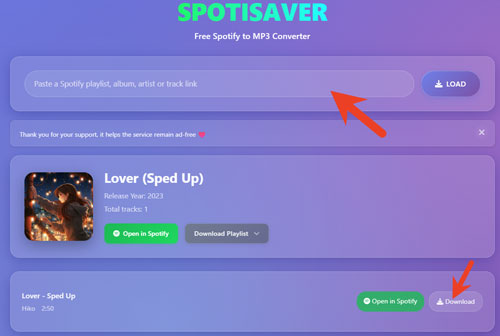
How to Export Spotify to MP3 Online via Spotisaver
Step 1. Find and copy the Spotify song or playlist link you want to convert.
Step 2. Visit Spotisaver official website and input the copied Spotify track URL into the box on the screen. Next, tap the LOAD button.
Step 3. After loading, tap the Download button to start to download Spotify to MP3 online.
No need to install an extra software on your device;
Work on any web browser on mobile and desktop devices;
Preserve basic ID3 tags
Output low audio quality;
Only output MP3 audio format;
No support for podcasts, shows and artists;
Not stable, often crashes
2. SpotDown
Spotdown supports to remove DRM from Spotify and convert Spotify music to MP3 files. It supports playlists, songs, albums and artists from Spotify. But please proceed with caution, as clicking the download button frequently triggers unpredictable redirect ads. Furthermore, the output format is limited to MP3. You will need to manually rename the file to remove the promotional website tags before adding it to your music library.
How to Download Spotify to MP3 Online via SpotDown
Step 1. Find and copy the link address to the song, playlist, artist or album from the Spotify platform.
Step 2. Visit Spotdown Spotify Downloader online website, put the copied Spotify track's URL into the text bar on the screen, then tap the "Download" button. Besides, you can directly search for the content by typing the artist name or song title in the text box.
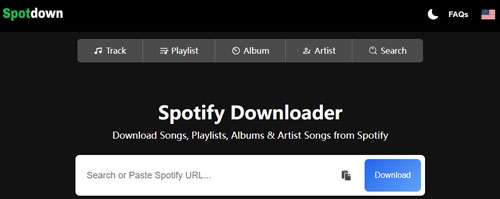
Step 3. After that, click the "Get Link" button and start downloading Spotify music to MP3 online.
Support songs, playlists, artists and albums;
Keep metadata
Don't support podcasts and audiobooks;
Support MP3 output format only;
Output lossy audio quality (128kbps)
3. Spotidownloader
Spotidownloader is a free and the most reliable web-based music downloader and converter for Spotify users. It can download not only a single song but also an entire playlist without ad interruptions. Besides, it has a clean interface and no ads on the page.
However, it only supports MP3 output format and there is no audio editing function.
View also: How to Edit Spotify Music
How to Download and Convert Spotify to MP3 Online Free via Spotidownloader
Step 1. Go to the spotidownloader.com webpage. Then open the Spotify Web Player or Spotify desktop app to copy the URL of Spotify songs or playlists. After that, please paste it into the text address shown in the image. Then click the 'Paste' button to add it to this online tool.

Step 2. Click the 'Download' button to get Spotify files for a while. After the conversion, you can locate them by clicking the 'Show in Folder' button.

It's well-designed for Spotify users only;
Available for computers and mobile devices
No Spotify audio editing feature
4. SpotiDown
Completely available for Windows, macOS, Android, and iOS operating systems, SpotiDown is an open-source and free Spotify to MP3 converter online. It can convert and download Spotify music into 128kbps MP3 format with original ID3 tags preserved. Designed with a clean and safe website, it helps anyone convert Spotify songs to native MP3 files without breaking a sweat. What's more, this online Spotify to MP3 converter free accomplishes the conversion task in just 2 simple steps.
But it needs to be pointed out that the downloaded file by SpotiDown sometimes is an empty file. Although it can load all the song lists in an album or playlist at the same time, you still have to click the 'Get Download Link' button one by one to get the corresponding download link. There is no doubt that this will take more time.

How to Use SpotiDown to Convert Spotify to MP3
Step 1. Copy and paste the URL of your selected Spotify song into the link box on SpotiDown online website.
Step 2. Then hit on the 'Download' button > 'Download MP3' option, and it will start downloading added Spotify songs to MP3.
Get Spotify MP3 files without spending a cent;
All ID3 tags will be retained well
Unstable operating process;
There is loss of output audio quality
5. SpotMate
SpotMate is also an online tool to convert Spotify to MP3. It supports Spotify tracks, albums and playlists and keeps high audio quality. Now, let's see how it works.
SpotMate also provides an Android app for users to download music from Spotify in MP3 format. So, you can also download its app to make it on your Android device.
How to Convert Spotify to MP3 Online via SpotMate
Step 1. Go to the Spotify platform and find the music tracks that you want to download. Then copy the link address of the track.
Step 2. Open the SpotMate website from the web browser on your device. Then paste the copied link into the blank box. Next, hit on the 'Start' button. It will then start to analyze and detect the track.

Step 3. Later, you will see the track cover art, the Convert button, the Download Another Song button, etc. on the screen. Click on the 'Convert' button to let SpotMate start to convert Spotify music to MP3 online.

Step 4. After that, hit the 'Download' button to download Spotify files to MP3 format on your computer.

Support Spotify songs, playlists, and albums;
Convert Spotify songs to MP3 at a fast speed;
Keep high-quality audio files;
Provide an Android app
Not support Spotify audiobooks, podcasts, etc.;
Only output MP3 audio format
6. SpotifyMate
SpotifyMate is also an online tool for users to download and convert Spotify files to MP3. Besides, it has PWA (Progressive Web App) feature that allows users to make a shortcut on their desktop for quick access. Yet, it can't convert songs in batches and it outputs low-quality music.

How to Download Spotify to MP3 Online via SpotifyMate
Step 1. Open SpotifyMate official website from a web browser on your device.
Step 2. Go to Spotify Web Player or Spotify official app. Then get the link to the song you like.
Step 3. Put the link into the text box on the SpotifyMate webpage. Then hit on 'Download' and it will start the process.
Free;
Available for all web browsers
No support to download tracks in batches;
Low output music quality
There are other online tools like Spowload, SpotiSongDownloader, etc. to help you. For more online solutions, please refer to Top Best Spotify Playlist Downloader Online.
Method 3. How to Convert Spotify to MP3 Free
If you prefer using a Spotify to MP3 converter free, here we will provide two desktop apps for your reference. They are better for tech-savvy users.
1. Audacity
Audacity is a free and open-source professional digital audio editing and recording software for Mac, Windows, and Linux. So, there is no doubt that you can use Audacity to record Spotify for free easily.
Besides converting Spotify playlist to MP3 for free, Audacity also supports other common formats like WAV, FLAC, and AIFF. In addition, it allows you to edit Spotify recordings by trimming and cutting, adding sound effects, and more. However, Audacity is a bit complicated for novices to use.
How to Record Spotify to MP3 Free via Audacity
Step 1. Launch Audacity and hit the 'Edit' button from the top-left toolbar. Click the 'Preferences' > 'Audio Host Box' > 'Windows WASAPI' button.

Step 2. Select 'Transport' > 'Transport Options' > 'Software Playthrough' to turn it off while recording. Choose to export Spotify format as MP3 from the 'Options' button.

Step 3. Press the red 'Record' button and play Spotify music. It will start to record Spotify to MP3 free in real-time. When the recording is done, simply click the 'Stop' icon to save Spotify MP3 tracks to your computer.

Record music from Spotify, microphone, or other sources;
Totally free to use;
Available to rip music from Spotify on Linux operating system;
Add ID3 tag info to the output MP3 Spotify files
The real-time recording process costs you lots of time;
Unable to grab metadata automatically;
A bit complicated for beginners to use
2. spotDL
SpotDL is a safe and open-source command-line tool that uses the Spotify API to find and download songs from YouTube. Besides, there is no ads in the tool.

How to Convert Spotify Songs to MP3 for Free via SpotDL
Step 1. First, you need to install Python on your computer from the official Python website.
Step 2. Then open your command prompt (Windows) or terminal (Mac/Linux) and enter the following command: python -m ensurepip --default-pip to install pip.
Step 3. After that, you can install spotDL by entering the following command in your command prompt or terminal: pip install spotDL.
Step 4. Next, enter the following command in your command prompt or terminal: spotDL --version to verify that spotDL has been installed correctly. If it has been installed correctly, you should see the version number shown on the screen.
Step 5. Now, open Spotify app and find the song you want to download.
Step 6. Right-click on the target song and copy its link address.
Step 7. Later, open the command prompt (Windows) or terminal (macOS/Linux).
Step 8. Run the following command: spotDL [URL], replacing [URL] with the URL address you copied from Spotify.
Step 9. After that, click on the "Download" button to download and convert Spotify music to MP3.
Totally free;
Work on Windows/Mac/Linux;
Convert Spotify files and save them in 256kbps;
Keep ID3 tags, and album art
Not easy to install and use for beginners
Method 4. How to Download and Convert Spotify to MP3 Android and iPhone
Many Spotify lovers enjoy listening to music on the go using their mobile devices. The free online Spotify music converters above also support use on mobile web browsers. But we also would like to show you some Spotify MP3 converter for Android and iOS.
1. SpotiFlyer (For Android)
SpotiFlyer is a cross-platform Spotify to MP3 converter free Android. It is not only compatible with Android but also with Windows, macOS and Linux operating systems. Now, it supports five streaming music services, including Spotify, Gaana, YouTube Music, Jio-Saavn, and SoundCloud. So, SpotiFlyer for Android helps you convert Spotify songs, tracks, albums, playlists, etc. on Android devices effortlessly.
How to Convert Spotify Files to MP3 Android for Free via SpotiFlyer
Step 1. Open SpotiFlyer for Android on your device and find the Spotify option.
Step 2. Search for Spotify songs you'd like to convert. Then click the 'Share' > 'Copy Link' option to copy the Spotify URL and paste it into SpotiFlyer. Then, tap the 'Search' button to load Spotify music.

Step 3. Now, you can simply press the 'Download All' button to convert Spotify files to MP3 on Android phones via SpotiFlyer.
View also: How to Download Spotify Songs on Android

Available for Android, Windows, Mac, and Linux;
Support Spotify tracks, playlists, and albums;
Download Spotify songs at a fast speed;
Keep full metadata
It only works for people who are in a place where YouTube Music and JioSaavn are available
2. Fildo (For Android)
Besides SpotiFlyer, Fildo is also a Spotify MP3 converter for Android. It allows you to convert Spotify downloads to MP3. In this case, you can listen to Spotify music and playlists offline without ads for free. But remember, you can't add MP3 files to it for playback. Also, it doesn't have its own music source, which causes some Spotify songs can't be successfully downloaded. Notably, it released versions for Windows 10, Windows 10 Mobile, and Xbox One to stream and explore music.

How to Download Spotify to MP3 Format on Android with Fildo
Step 1. Navigate to Fildo's official website and download Fildo Spotify downloader for Android on your phone.
Step 2. Open Fildo and navigate to 'More' > 'Import Spotify'. Then you will need to connect to your Spotify account.
Step 3. Then you can choose to import your Spotify playlists. Once done, tap the 'Download' option to start downloading Spotify music.

Easy to use and navigate by albums, genres, and folder;
Keep 100% original sound quality
Have some ads;
Not a completely safe app
3. Telegram (For iOS)
There are many Spotify bots for iPhone that can access the Spotify database. In this case, they can easily download and convert Spotify tracks for free on iOS devices. Telegram is one such popular tool, with which you can download MP3 from Spotify on your iOS devices.
How to Convert Spotify Playlist to MP3 on iPhone Free via Telegram
Step 1. Open the Telegram Spotify file converter and search for the Spotify bot to start it on your iOS device.
Step 2. Copy the Spotify link from your Spotify app and paste it into Telegram's chatting bar. Then tap the 'Send' button to download Spotify songs for free on your iPhone.

It's free to convert Spotify song on iPhone
It downloads music from YouTube instead of Spotify library
4. Spotifydl (For iOS)
If you are an iOS user, you can find some Siri shortcuts on your device. Spotifydl is a shortcut available for all Spotify users. It allows you to convert and turn Spotify songs into MP3 audio directly on your iOS device. However, it lacks maintenance or banned.

How to Download Spotify Music to MP3 on iPhone Free via Spotifydl
Step 1. Open Shortcut and search for Spotifydl. Once found, add Spotifydl to it.
Step 2. Open Spotify and copy the URL of your desired music. Paste it into Spotifydl and click on 'OK' to load music.
Step 3. Tap on the Spotify song you want to convert. Then you can choose to change the download location and tap on 'OK' to start the conversion process.

Easy to use;
Available for iOS devices
Don't keep ID3 tags;
Maybe not stable;
Need to work with the Spotify app
Method 5. How to Record Spotify to MP3 via Professional Audio Recorder
In this part, we will go back to the traditional means. That means ripping and downloading Spotify songs, playlists, albums, etc. with the aid of recording technology. Here, you will find the top best Spotify music recorders to export Spotify to MP3.
AudFree Audio Capture
AudFree Audio Capture is an audio recorder for Windows and Mac. It allows users to rip and save Spotify music to MP3, WAV, FLAC, WAV, AIFF, WMA, etc. without damaging the original audio files. It can automatically detect and retain song titles, album covers, and other ID3 tags.
With a built-in audio editor function, it enables users to edit ID3 tags of Spotify songs manually and cut music from Spotify losslessly. AudFree Audio Capture can grab multiple Spotify songs at the same time to save you time and improve your efficiency.
Besides, it allows you to download and record music from any streaming music service, local media player, online radio station, etc. With this software, you are able to explore all kinds of music anywhere.
How to Convert Spotify Music to MP3 via AudFree Audio Capture
Step 1. Install and fire up the AudFree Audio Capture on your PC or Mac computer. Then you will get its main interface. To capture audio from Spotify, you need to add the Spotify app or web browser to AudFree first. Please hit on the 'Select/Add an App' section to import one of them.

Step 2. Click on the 'Format' section to choose MP3 audio format for Spotify music from the list. Also, you can choose the audio quality as High, Medium, or Low. Then you can hit the 'edit' icon to go to alter encoder, bit rate and so on.
After that, tap the Spotify option and hit 'Start' to start the Spotify app. Next, you can find and play Spotify songs and playlists, AudFree tool will enter into Recording Mode at the same time to record Spotify music.

Step 3. Once the Spotify music ends, the recording will pause and you can click on the 'Stop' button to finish the process. Then you can click the 'Trim' or 'Edit Tag' icon to do some customizing settings of downloaded audio tracks or directly click the 'Save' button. All Spotify tunes will be converted and saved as MP3 files on your local computer.

Record and download music from Spotify, Tidal, Deezer, Amazon Music, etc.;
Multiple output formats, including MP3, WMA, OGG, FLAC, AAC, etc.;
Keep original ID3 tags, edit downloaded audio files;
Customize the output parameters as you want
It costs $14.95/month to unlock the ripping length limitation
Comparison of 5 Methods to Convert Spotify Songs to MP3
Above are the tools we shared with you to convert Spotify to MP3 online, free or professional. But, which one is better for you? Let us understand the difference between the above tools in detail from the comparison table below.
| Features | AudFree Spotify Music Converter | Audacity | SpotDL | Online Way | AudFree Audio Capture | Mobile Way |
|---|---|---|---|---|---|---|
| Compatible OS | Mac/Windows | Mac/Windows/Linux | Mac/Windows/Linux | Online | Windows/Mac | Android and iOS |
| Supported Input Format |
All Spotify audio content | Any audio | Spotify | Spotify songs/playlists/albums | Any music | Spotify |
| Supported Output Format |
MP3, AIFF, Lossess, WAV, FLAC, M4A, M4B |
MP3, AIFF, etc. | MP3 | MP3 | MP3, FLAC, OGG, M4R, etc. | MP3 |
| Audio Channel | Mono, Stereo | ❌ | ❌ | Mono | Mono/Stereo/Auto | ❌ |
| Bit Rate | 8 - 320kbps | 16 bit/24 bit | 256kbps | Low | Auto, 16-320kbps | ❌ |
| Sample Rate | 8000 - 192000Hz | ❌ | ❌ | ❌ | Auto, 8000-192000Hz | ❌ |
| Conversion Speed | 13X | 1X | 1X | 1X | 1X | 1X |
| Customize Output Quality | ✅ | ✅ | ❌ | ❌ | ✅ | ❌ |
| Cut / Merge Function |
❌ | ✅ | ❌ | ❌ | ✅ | ❌ |
| Batch Conversion | ✅ | ❌ | ❌ | ❌ | ✅ | ❌ |
| Keep ID3 Tags | ✅ | ❌ | ✅ | ✅ | ✅ | ✅ (Spotifydl ❌) |
| Ease of Use | ✅ | ❌ | ❌ | ✅ | ✅ | ✅ |
| Safety | 100% virus free | Safe | Safe | Adware Risk | 100% virus free | Safe |
| Success Rate | 100% | Medium | Medium | Low | High | Low |
| Price | $14.95/month | Free | Free | Free | $14.95/month | Free |
| Ratings | ⭐️⭐️⭐️⭐️ | ⭐️⭐️ | ⭐️⭐️ | ⭐️⭐️ | ⭐️⭐️⭐️ | ⭐️⭐️ |
Tips to Choose the Best Spotify to MP3 Converter
You should know that a good tool will bring twice the result with half the effort. So, there are some professional tricks for choosing a tool to help you quickly and easily let Spotify download MP3:
1. Audio Quality and Format Support
Output audio quality is the key factor. You should choose the tool that supports: true 320kbps MP3 format, and Lossless formats like FLAC and WAV for audiophiles setup. Besides, you need multiple format options to ensure that your music plays seamlessly across all players and devices.
2. Performance and Efficiency
To save time and improve conversion efficiency, the conversion speed is also an important factor you need to compare. The tool you choose must have batch conversion capabilities for entire playlists and albums and run at a fast rate.
3. Usability and File Management
The converter needs to have the ability to automatically save the metadata and ID3 tags like title, artist, etc. from Spotify songs, which will help organize music files easily. Also, it should have a user-friendly interface that is easy to navigate, even for users who are not tech-savvy. The operation should be straightforward and intuitive.
4. Safety, Stability and Value
The converter should be secure and stable to use online. In this case, your device won't get any virus or risk while using the online tool. It needs to be updated frequently to work well with the latest Spotify platform. Also, prompt customer support can be the icing on the cake should you run into any issues.
Besides, it needs to have a stable and successful conversion and downloading and work with Spotify Free plans to download music from Spotify. By the way, it would be better if it supports multi-language, which will be convenient.
Keeping the above criteria in mind, you can see that AudFree Spotify Music Converter stands out among these approaches. What makes it extraordinary is its faster conversion speed and perfect output quality. It can keep the 100% lossless audio quality of Spotify tracks. You can just install it on your computer to try it for free. It will bring a wonderful listening experience for both Spotify Free and Premium users.
FAQs about Converting Spotify to MP3
Do I Need a Spotify Premium Account to Use These Spotify to MP3 Converters?
No. These tools can work well with a Spotify Free account.
Why Do You Need to Convert Spotify Files to MP3?
By converting Spotify music to MP3, you can back up and listen to Spotify songs offline on any device you want forever, even if you cancel Spotify Premium. Also, you can burn Spotify playlists to CD, manage them in any way you like and so on.
Is It Legal to Convert Spotify Music to MP3?
It depends. Converting Spotify to MP3 for personal use is legal. But distributing all Spotify downloads and sharing them with others are forbidden. Besides, in some countries, using an online MP3 converter for Spotify without the permission of the copyright owner will violate Spotify's terms of service.
How Can I Play These Converted Spotify MP3 Files in My Car?
You can copy these MP3 files to a USB flash drive and plug it into your car's entertainment system. Or, you can transfer the music files to your phone and stream it to your car via Bluetooth.
View also: How to Play Spotify Music in the Car
Final Recommendations
That's it for the best 5 different ways to convert Spotify to MP3 free, online as well as professional.
If you care about music quality and conversion speed, then you'd better use AudFree Spotify Music Converter. It allows you to batch download any Spotify music content at up to 13 times faster losslessly. It also supports multiple output formats and preserves all ID3 tags.
If you want a completely free solution, you can choose Audacity or SpotDL. They are free and all compatible with Windows, Mac and Linux.
If you don't like downloading an extra app to convert Spotify songs, use the online Spotisaver, Spotdown, SpotifyMate, SpotMate, or SpotifyDown. They can be used not only on computers but also on mobile devices. But please note that the online solution will reduce the output audio quality of Spotify music.
If you want to record music from Spotify in real-time, you can opt to AudFree Audio Capture and it allows you to cut and merge audio files.
Looking for a specific Spotify to MP3 converter for Android and iOS? For Android, SpotiFlyer or Fildo are your best options. For iOS devices, you can use Telegram or Spotifydl to convert Spotify music to MP3.
Just choose the tool that suits your needs now to enjoy Spotify music.

Chief Editor


